The Tool Contract Layer
Posted on Wed 04 March 2026 in Python
Seams series
- Part 0. Stop Building Your AI Product Around Today's Model
- Part 1. Designing for Model Swaps
- Part 2. The Tool Contract Layer
- Part 3. The Observability Layer
The Problem Story
Your agent has a weather tool. It works fine with GPT-4o-mini. You upgrade to a newer model and suddenly the tool stops being called - or worse, it's called with a city field instead of location, returning nothing useful. You spend an hour debugging before realising the model interprets the schema differently.
The schema was never explicit. It was inferred by LangChain from the Pydantic model, and the two models inferred it slightly differently.
Or you add a web search tool. Three months later, your compliance team asks which tools make external API calls. You check the codebase. The answer is spread across five files, some docstrings, and one developer's memory.
Both problems have the same root cause: the tool's contract - what it accepts, what it does, what permissions it needs - lives implicitly in the implementation rather than explicitly in a declaration.
The Principle: Declare the Contract, Don't Infer It
Seam 3 is the tool boundary. Like the other seams, the goal is a narrow, explicit interface: the rest of the system should know exactly what a tool promises without reading its implementation.
That means every tool declares three things upfront:
- What it accepts - a JSON Schema object, not inferred from Pydantic, explicitly written
- What it does - a description the LLM uses to decide when to call it
- What it needs - a list of required permissions (external_api, read_web, etc.)
This is the ToolContract:
# app/tools/base.py
@dataclass
class ToolContract:
    name: str
    description: str
    # JSON Schema object - written explicitly, not generated
    args_schema: dict[str, Any]
    required_permissions: list[str] = field(default_factory=list)
Every tool in the system carries one. The agent runner, the policy enforcement layer, and the /api/tools endpoint all read contracts - none of them read tool implementations.
The Code
The base class
# app/tools/base.py
class ChangeSeamsTool(BaseTool):
    contract: ToolContract

    def get_contract(self) -> ToolContract:
        return self.contract
ChangeSeamsTool extends LangChain's BaseTool and adds one required field: contract. If you forget it, instantiation fails. There's no way to register a tool without a contract.
A minimal tool - no external dependencies
# app/tools/echo.py
class EchoTool(ChangeSeamsTool):
    name: str = "echo"
    description: str = "Echoes back the input text. Useful for testing the tool contract pipeline."
    args_schema: Type[BaseModel] = EchoInput
    contract: ToolContract = ToolContract(
        name="echo",
        description="Echoes back the input text.",
        args_schema={
            "type": "object",
            "properties": {"text": {"type": "string", "description": "The text to echo back"}},
            "required": ["text"],
        },
        required_permissions=[],
    )

    def _run(self, text: str, ...) -> str:
        return f"Echo: {text}"
Notice that args_schema appears twice: once as Type[BaseModel] = EchoInput (which LangChain uses for validation) and once as a plain JSON Schema dict in the contract (which the rest of the system uses for introspection). That duplication is deliberate. The Pydantic model can change shape or add validation rules without the contract's public schema changing - the contract is the API surface, the Pydantic model is the implementation.
A tool that needs permissions
# app/tools/weather.py
contract: ToolContract = ToolContract(
    name="weather",
    description="Current weather via OpenWeatherMap API.",
    args_schema={
        "type": "object",
        "properties": {
            "location": {
                "type": "string",
                "description": "City name, e.g. 'Dublin' or 'New York'",
            }
        },
        "required": ["location"],
    },
    required_permissions=["external_api"],
)
required_permissions=["external_api"] is the declaration. It doesn't enforce anything by itself - that's the policy layer's job, described below. But it makes the requirement visible, queryable, and auditable without reading the implementation.
Graceful key handling
Every tool that needs an API key checks for it at call time and returns a string, not an exception:
def _run(self, location: str, ...) -> str:
    api_key = settings.openweathermap_api_key
    if not api_key:
        return "Weather tool unavailable: OPENWEATHERMAP_API_KEY not configured."
    ...
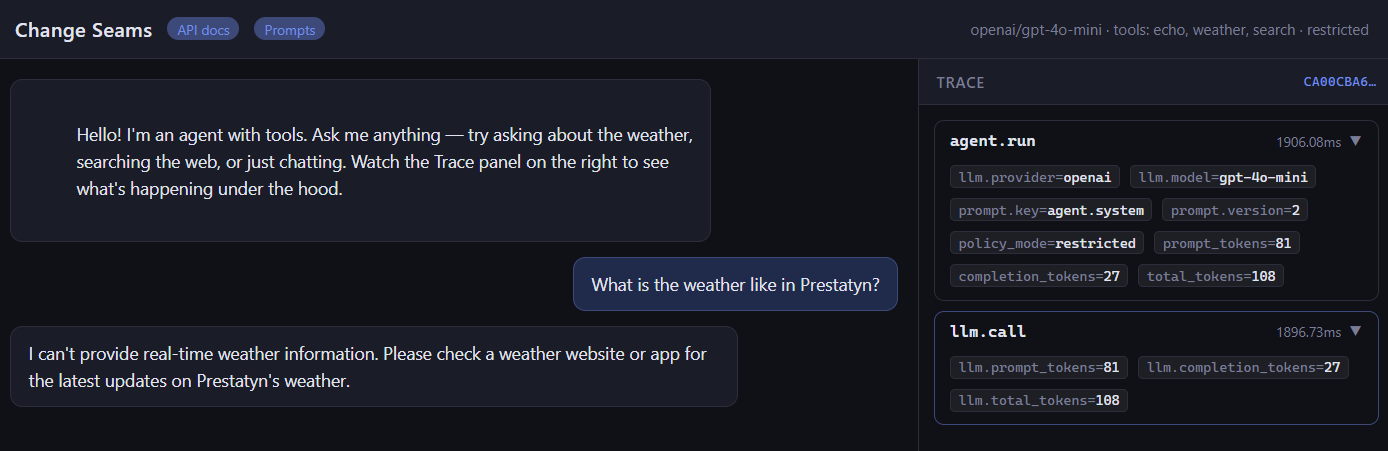
The agent receives a readable string and can tell the user the tool is unavailable. It doesn't crash. This matters because tools are registered at startup - you don't want a missing key to prevent the server from starting, or to blow up mid-conversation.
The Registry
Tools register themselves in app/tools/__init__.py:
TOOL_REGISTRY: dict[str, ChangeSeamsTool] = {}

def register(tool: ChangeSeamsTool) -> None:
    TOOL_REGISTRY[tool.name] = tool

def get_enabled_tools(
    enabled_names: list[str],
    allowed_permissions: set[str] | None = None,
) -> list[ChangeSeamsTool]:
    tools = [TOOL_REGISTRY[n] for n in enabled_names if n in TOOL_REGISTRY]
    if allowed_permissions is not None:
        tools = [
            t for t in tools
            if set(t.contract.required_permissions).issubset(allowed_permissions)
        ]
    return tools

register(EchoTool())
register(WeatherTool())
register(SearchTool())
get_enabled_tools does two things: it filters by ENABLED_TOOLS (what's switched on in config), then by allowed_permissions (what the current policy mode permits). A tool that isn't in the registry doesn't exist to the agent. A tool whose permissions aren't allowed by the current policy also doesn't exist - it's never handed to the LLM.
The agent runner wires them together:
# app/agent/runner.py
tools = get_enabled_tools(settings.enabled_tools, settings.allowed_permissions)

settings.allowed_permissions comes from policy_mode:

# app/config.py
@property
def allowed_permissions(self) -> set[str]:
    if self.policy_mode == "restricted":
        return set()                          # no external calls
    return {"external_api", "read_web"}       # default - all allowed
Set POLICY_MODE=restricted in .env and the agent loses access to weather and search without a code change or restart. echo still works - it declares no permissions.
The Contract Endpoint
Because contracts are explicit data, they're trivially exposable:
# app/api/tools.py
@router.get("/api/tools")
def list_tools() -> list[dict]:
    return [
        {
            "name": tool.contract.name,
            "description": tool.contract.description,
            "args_schema": tool.contract.args_schema,
            "required_permissions": tool.contract.required_permissions,
        }
        for tool in TOOL_REGISTRY.values()
    ]
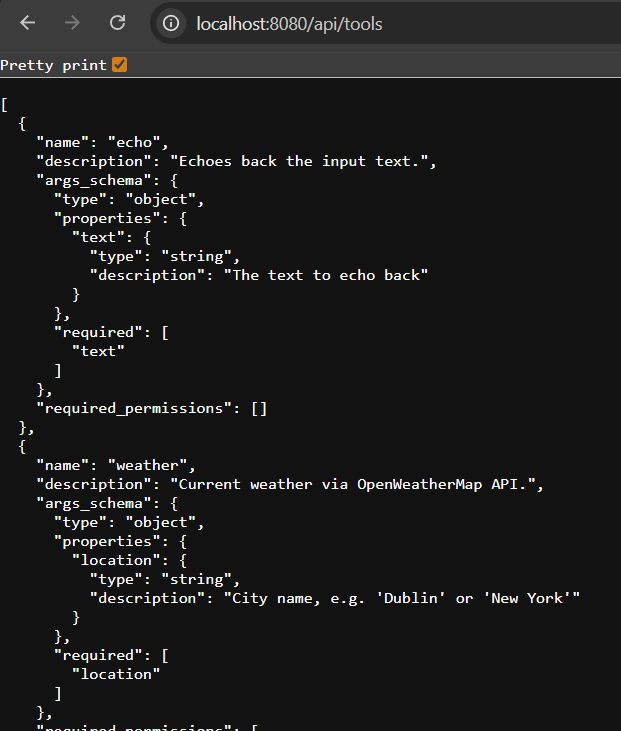
Hit GET /api/tools and you get the full registry - every tool, its schema, its permissions - without touching source code. This answers the compliance question from the opening story: which tools make external calls? Filter required_permissions for "external_api". Done.
Why Explicit JSON Schema?
LangChain can generate the function-calling schema automatically from a Pydantic model. So why write it by hand?
Three reasons:
1. Model portability.
Different LLMs interpret auto-generated schemas differently. A field named location with description "City name" in Pydantic might be serialised as location or city depending on the model and LangChain version. An explicit JSON Schema is what you actually send - no surprises across model upgrades.
2. Stability under refactor.
When you rename a Pydantic field for internal clarity, the auto-generated schema changes. If the LLM has cached or fine-tuned on your old schema, behaviour changes silently. An explicit contract only changes when you decide to change the public interface.
3. Introspection without instantiation.
The contract is a dataclass with plain dicts - no Pydantic, no LangChain, no imports beyond dataclasses. Anything can read it: the policy layer, the API endpoint, a schema validator, a test. You don't need to instantiate a tool to inspect its contract.
Skill-Hardening Drills
Drill 1 - Add a new tool and verify the contract is exposed
Add a tool that calculates the number of days between two dates (no external API needed). It should:
- Extend ChangeSeamsTool
- Declare a ToolContract with
required_permissions=[] - Have an explicit JSON Schema with two date string fields
- Return a graceful string if the input can't be parsed
After adding it to __init__.py:
curl http://localhost:8080/api/tools | python -m json.tool
Your new tool should appear with its full contract.
Then enable it:
# .env
ENABLED_TOOLS=echo,days_between
Restart and ask the agent: "How many days between 1 January 2025 and today?"
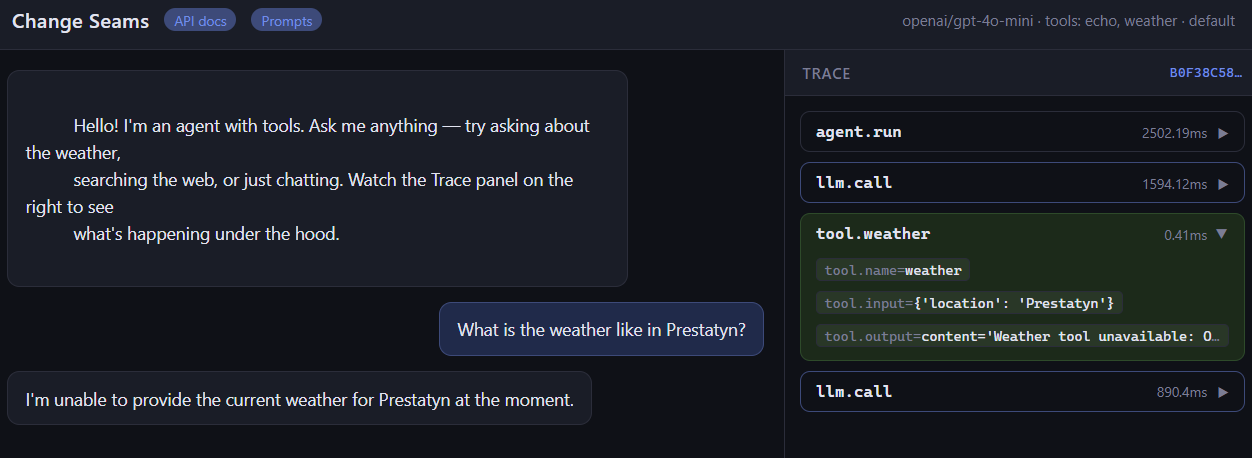
Goal: The tool appears in /api/tools, the agent calls it, and the trace shows the tool invocation in the spans. If you can do that without touching runner.py or any other tool file, the seam is working.
Drill 2 - Test permission enforcement without code changes
With weather and search registered, confirm that POLICY_MODE=restricted blocks them:
# 1. Normal mode - weather tool is available
curl http://localhost:8080/api/chat \
  -H "Content-Type: application/json" \
  -d '{"message": "What'\''s the weather in Dublin?"}'
# Agent calls the weather tool, returns temperature

# 2. Switch to restricted mode - no restart needed if using env override
POLICY_MODE=restricted
docker-compose restart backend

# 3. Same question, restricted mode
curl http://localhost:8080/api/chat \
  -H "Content-Type: application/json" \
  -d '{"message": "What'\''s the weather in Dublin?"}'
# Agent responds that it doesn't have access to weather data
Check the tool_calls field in the response - it should be empty under restricted mode. The tool was never handed to the LLM, so it could never be called.
Goal: Permission enforcement happens at the registry level, not inside the tool. The tool implementation doesn't change. The LLM doesn't see tools it isn't allowed to use.
The Checklist
Add these to your tool review checklist:
- [ ] Does the tool declare an explicit JSON Schema in its contract, not relying on auto-generation?
- [ ] Does required_permissions accurately list every external resource the tool touches?
- [ ] Does the tool return a readable string (not raise) when its API key is missing?
- [ ] Does
GET /api/toolsshow the new tool immediately after registration? - [ ] Does
POLICY_MODE=restrictedblock the tool if it has external_api in its permissions? - [ ] Can you add or remove the tool from
ENABLED_TOOLSwithout changing any other file?
If all six pass, the tool is properly seamed. If any fail, the contract is leaking into places it shouldn't be.
Where to Go From Here
Github repo
Clone the repo, run docker-compose up, and try both drills. The test suite in tests/test_tools.py covers contract shape, permission filtering, and the registry endpoint - run it with make test (no API keys needed).
Next post: Seam 5 in depth - the observability layer, how OtelCallbackHandler accumulates token usage and tool spans per request, and how to swap the exporter from console to a real OTEL backend without touching anything else.
The contract is the interface. The implementation is the detail. Only the contract should cross the seam boundary.